
uick summary: Attendee registration is the process of collecting, organizing, and confirming information about people attending an event. It includes registration forms, ticket or access categories, attendee records, confirmation emails, and preparation for event-day check-in. A well-managed registration process helps organizers plan attendance, prepare personalized badges, and reduce problems when guests arrive.
Attendee registration seems straightforward until an event starts growing.
For a meeting with 30 people, collecting RSVPs through an online form might be enough. The organizer receives a list of names, sends a few reminders, and prepares name tags.
At a conference with 800 attendees, the same process becomes considerably more complicated.
People register at different times, select different ticket types, change their contact information, and request accommodations. Speakers may need special access. Sponsors and exhibitors may arrive before the general audience. Some attendees never show up, while others arrive without registering.
All of these situations depend on the quality of attendee data.
Events such as Web Summit, Collision, Tech Talent, InnovateWest, Tech Exit, and SaaS North illustrate the different environments organizers must plan for, from technology networking events to larger conferences with multiple attendee categories.
The objective is not simply to collect as many registrations as possible.
It's to create a registration experience that makes participation easy while giving organizers the information needed to deliver a well-run event.
What is attendee registration?
Attendee registration is the process of collecting information from people planning to attend an event, confirming their participation, and organizing their records for event operations.
Most events use an online registration form to collect names, contact details, ticket selections, and relevant attendance preferences.
Depending on the event, the registration process may also involve ticket sales, online payment, group registrations, session bookings, and access categories.
There are several related activities that organizers should distinguish.
| Process | Purpose | Timing |
|---|---|---|
| Attendee registration | Collects information and confirms intended participation | Usually before an event |
| Attendee management | Maintains accurate records, categories, and changes | Before, during, and after |
| Event check-in | Verifies arrivals and records attendance | At the event |
| Badge printing | Creates attendee identification and credentials | Before or during the event |
These activities often rely on the same information, but they don't necessarily use the same software.
For example, someone might register through Eventbrite, have their information exported into a spreadsheet, and receive a personalized badge produced through ConferenceBadge.
What matters is that the attendee's information remains accurate as it moves between these steps.
Amanda Collett's perspective on attendee registration:
The biggest issue is inconsistency in data for attendees. It can be something as simple as camel casing or title casing for company information, misspelt names or even longer than you can manage names. I once had someone with 29 characters in their first name and last name …
We’ve helped in many conferences, some examples are Web Summit, Collision, SAAS North and InnovateWest to name a few. Attendee information is always something we want to manage as priority one. This starts with even where the source of the attendee information is. Whether it's Excel or Google sheets, we want to prioritize any inconsistencies not seen in registration.
The solution is usually to standardize the data, identify duplicates, and review any missing information before approving the badges for production.
It’s better to fix the information in a spreadsheet (especially with a copilot / AI) than having to reprint the information.
How does attendee registration work?

The registration flow begins with understanding who is attending and what information the event requires.
An organizer planning a university research conference will have different requirements from a company organizing a sales kickoff or a trade show with hundreds of exhibitors.
However, most attendee registration processes follow a similar progression.
Define attendee requirements before collecting names
Before launching registration, organizers should determine the expected attendance, attendee categories, admission requirements, and whether participants need to select sessions.
This prevents the registration system from becoming a collection of questions added whenever someone requests new information.
A university symposium, for example, may need to distinguish presenters from general attendees. A technology conference may need categories for speakers, sponsors, exhibitors, VIPs, and staff.
These differences affect everything from check-in instructions to badge design.
Choose an event registration platform
Once the requirements are clear, organizers can select an event registration platform.
A general form builder may be sufficient for a small internal gathering. A commercial conference offering different ticket prices, group registrations, and workshops may need dedicated event registration software.
The platform should make it easy to track registrations, modify attendee records, and export information.
Consider how it will work with other systems, too.
If the event requires an event app, CRM connection, personalized badges, or QR code check-in, organizers should understand how attendee information will move between applications.
Create and publish the registration page
A registration page should make the event's purpose and admission requirements clear before asking for personal information.
Attendees need to know the event dates, location, cost, ticket availability, and what they receive by registering.
The form should be mobile-friendly, use clear labels, and avoid unnecessary questions.
For a paid registration, the process also needs to support secure payment and confirm whether the transaction was successful.
Once submitted, confirmation emails should tell attendees what happens next.
For a free academic meeting, that might simply mean confirming a seat. For a multi-day industry conference, the confirmation may include ticket information, session instructions, and arrival details.
Manage attendee records as registration progresses
Registration data rarely remains unchanged.
An attendee may update their company, transfer a ticket to a colleague, or cancel their participation.
The organizing team needs a reliable way to make changes without creating duplicate records.
As the event approaches, attendee management becomes increasingly important because other teams begin using the information for catering, planning, communications, and badge preparation.
Prepare for arrival and badge distribution
Before the event, organizers should review their attendee list and identify missing or inconsistent information.
The badge production team may need names, companies, job titles, attendee types, or unique identifiers.
Staff also need a process for checking people in, resolving incorrect records, and issuing replacement credentials.
Once the event begins, check-in confirms which registered attendees actually arrived.
Afterward, organizers can compare registrations with attendance, identify no-shows, and use post event survey questions to evaluate the experience.
What information should an attendee registration form collect?

A well-designed attendee registration form collects enough information to support the event without making people answer questions that have no clear purpose.
The most important fields are usually the attendee's full name, email address, and registration category.
For professional conferences, an organization or company name may also be relevant.
But the correct fields depend on how the information will be used.
Collect information that has an operational purpose
Imagine a 250-person professional networking event.
Attendees need badges displaying their names and companies, but the registration form only collects names and email addresses.
A week before the event, someone realizes the design requires company information.
The team now has to send a follow-up email, wait for responses, and manually update records.
This work could have been avoided by identifying badge requirements before publishing the form.
The same applies to breakout sessions, dietary requests, and attendee categories.
The form should reflect what the event needs to deliver, not just what the registration platform is capable of collecting.
Separate badge names from billing names
Not everyone uses the same name in professional settings as they do for legal documents or payments.
A person registered as Jonathan may prefer Jon on their badge. Some attendees use abbreviated names or require special characters preserved.
An optional badge display name field can eliminate preventable corrections.
For larger events, this is especially important because hundreds of individual names may be transferred directly into badge printing software.
Use optional questions carefully
Custom questions can help organizers collect information about workshops, accessibility accommodations, dietary restrictions, or networking preferences.
However, collecting unnecessary personal information increases the amount of data staff must protect and manage.
The World Wide Web Consortium recommends clear form labels, useful instructions, and straightforward error messages so people can complete forms without confusion.
Example attendee registration form
| Field | Required? | Why it matters |
|---|---|---|
| Full name | Yes | Identifies the attendee |
| Email address | Yes | Enables registration confirmation |
| Badge display name | Optional | Supports preferred identification |
| Company or institution | If relevant | Helps networking and badge personalization |
| Attendee category | Usually | Determines ticket or access type |
| Session preferences | If relevant | Supports capacity planning |
| Accessibility requests | Optional | Helps organizers plan accommodations |
| Dietary requirements | Optional | Supports catering |
| Billing information | For paid events | Enables payment administration |
| Marketing consent | Optional where applicable | Separates promotional communications from event operations |
Organizers can adapt this attendee registration template to conferences, trade shows, corporate meetings, and university events.
Types of attendee registration

Not every attendee follows the same registration path.
The process should reflect the event format and the requirements of each group.
Online registration and pre-registration
Online registration allows organizers to collect participant information before anyone reaches the venue.
It supports attendance forecasts, advanced communications, session planning, and badge production.
For events with significant travel requirements, pre-registration also gives attendees time to organize accommodations and receive their conference welcome pack or arrival instructions.
Online registration is often the most practical starting point, even when an event also accepts walk-ins.
On-site registration and walk-ins
Some events allow people to register after arriving.
This flexibility is valuable for public exhibitions, community events, and conferences where last-minute participation is common.
However, on-site registration requires staff to collect attendee information, confirm eligibility, process payments when applicable, and provide credentials.
The more steps involved, the longer each unexpected registration can take.
A prepared workflow for walk-ins helps prevent these situations from disrupting attendees who registered in advance.
Group and corporate registrations
Corporate events frequently involve one person registering several colleagues.
The registration platform may process the booking as a group, but each attendee still needs an individual record.
Consider a company purchasing 25 tickets for its employees.
If the registration system captures only the buyer's contact information, the event organizer still lacks the names required for attendee badges.
The better approach is to maintain individual attendee details even when tickets are purchased or managed collectively.
VIP, speaker, sponsor, and exhibitor registration
Different attendee categories often require different questions and access arrangements.
A speaker may need presentation information. An exhibitor may require an organization name and booth details. A VIP may receive a different arrival experience.
Platforms that support separate registration paths can present relevant questions without overwhelming every attendee.
This also improves the quality of the data used for identification.
Free and paid registration
Free events primarily need to confirm attendance and collect relevant information.
Paid events introduce ticket prices, early bird pricing, payment confirmation, refunds, and other administrative requirements.
The registration experience should communicate those details clearly.
A paid attendee should never be left uncertain whether their payment was successful or their registration is confirmed.
What features should attendee registration software include?
The best attendee registration software depends on the event's size, complexity, and operational needs.
A small workshop may only require a form and an attendee list.
A large conference may need advanced ticketing, multiple registration paths, a searchable attendee database, integrations, and reporting.
Flexible registration forms and attendee management
Organizers should be able to customize fields, set required questions, and update attendee records without rebuilding the form.
Conditional logic can help by displaying questions based on attendee categories.
For example, selecting "Speaker" may reveal presentation questions, while selecting "General attendee" keeps those fields hidden.
EventsAir describes support for customizable registration paths and conditional logic in its event registration offering.
The value is not simply personalization. Different registration paths help collect accurate information without asking everyone unnecessary questions.
Ticketing, confirmation, and payments
Event registration software such as Eventbrite supports registration forms, ticket types, attendee lists, confirmation communications, and check-in capabilities.
A conference may also consider Cvent for broader event management and registration requirements.
The appropriate solution depends on whether organizers need paid ticket sales, online payment, invitation management, or more advanced conference operations.
Before selecting a provider, confirm the full cost of payment processing and any additional platform charges.
QR codes, check-in, and event applications
Some registration systems generate individual QR codes that attendees can present during check-in.
When connected to the right scanning system, these codes can help staff locate records and confirm arrivals.
An event app may also provide schedules, announcements, or networking features.
However, event organizers should not assume that any QR code will work with any event application.
QR codes for events must be generated and interpreted using compatible systems.
The same distinction applies to QR Code Event Badges. A printed code can represent an attendee identifier, but check-in or Lead Retrieval for events requires a system capable of using that identifier.
Badge creation and data exports
Badge printing is another important consideration.
The registration platform should provide the information required to produce personalized event credentials, either directly or through a reliable export.
ConferenceBadge supports attendee imports, variable badge information, multiple badge types, QR codes, and barcodes.
https://www.conferencebadge.com/name-badges
This allows organizers to work with registration information when producing custom event badges rather than manually recreating every name tag.
ConferenceBadge focuses on badge creation and production. Event ticketing, registration payments, and full registration form hosting may require separate tools.
How attendee registration connects to event check-in and badge printing
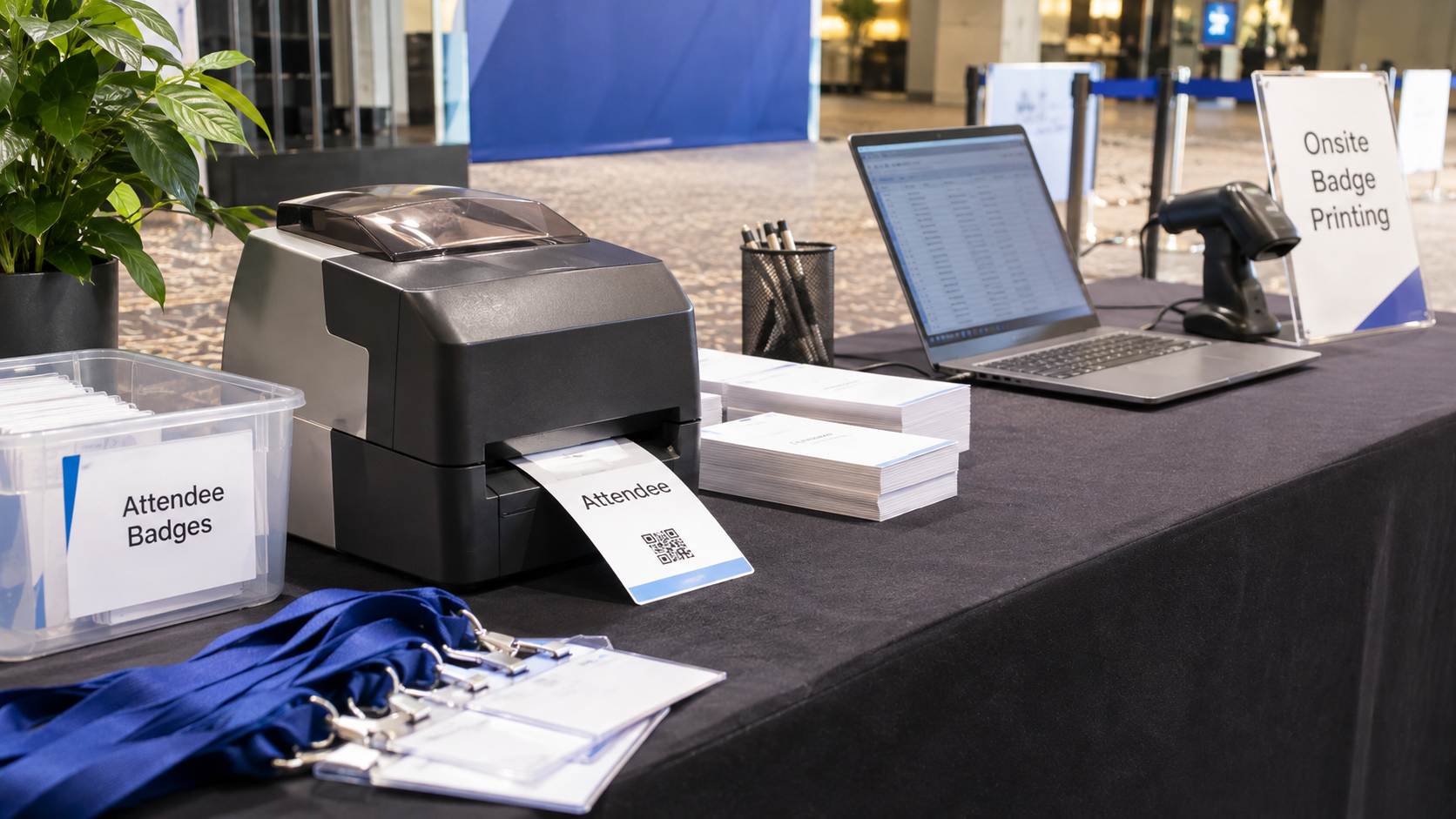
Attendee registration becomes especially valuable when organizers begin preparing for arrivals.
The information collected weeks earlier must now support real people moving through a physical venue.
And the first place inconsistencies often become visible is the registration desk.
Turn registration information into a reliable attendee list
Before producing badges, organizers should review the information received from the registration system.
Names should be complete, company information should be consistent, and attendee categories should match the intended badge types.
A conference attendee list template can provide a common structure, particularly when several people are responsible for collecting or editing registrations.
For a 600-person conference, even small inconsistencies can create considerable correction work.
Imagine one attendee record displaying "Chief Operating Officer" while another uses "COO." Neither is necessarily wrong, but the badge design must accommodate both.
Long names, special characters, and unexpected field lengths should also be tested.
These details affect badge readability and the quality of the attendee experience.
Creating personalized badges from attendee records
ConferenceBadge allows event teams to use attendee information in personalized badge designs.
Organizers can prepare name badges from Excel or name badges from Google Sheets by working with attendee data that has been exported and organized for the badge workflow.
The badge can combine attendee-specific details with fixed elements such as the event logo, colors, and design.
Different event badge sizes are suitable for different uses.
Trade Show Badges may prioritize attendee categories and networking information. Corporate Event Name Badges might emphasize names, companies, and departments.
Cardboard Badges offer a professionally printed credential format, while Name badge inserts work with holders that can be reused or replaced.
Organizers evaluating inserts and holders should confirm dimensions and orientation before ordering.
Even the font for an event name tag matters. If an attendee's name is too small to read comfortably, the badge is less useful for networking.
Amanda Collett's perspective on attendee data quality:
At Tech Talent, we once saw hundreds of issues at registration.
We offered onsite badge printing kits at ConferenceBadge to help organizers handle exactly these kinds of situations. Instead of having to improvise a handwritten badge or send someone offsite to print replacements, the registration team can produce an additional badge at the venue.
There should always be a designated person (or team) that handles registration issues. The important thing is recognizing that last-minute changes are going to happen. You can't prevent every one of them, but you can have a process in place so they don't disrupt the attendee experience.
Amanda Collett, CEO of ConferenceBadge
Plan for walk-ins and corrections
Even carefully managed events experience unexpected changes.
Someone registers late, changes companies, loses their badge, or finds a mistake in their printed name.
ConferenceBadge provides On site printing through its browser-based Print Center, which generates ready-to-print PDFs for selected attendees.
https://www.conferencebadge.com/products/on-site-printing
This makes it possible to prepare replacement badges using compatible printers at the venue.
A practical approach is to preprint most badges and reserve onsite printing for exceptions.
PDF badges can also be useful for smaller events that want to manage their own printing.
The alternative may be handwritten corrections or improvised DIY name tags, which can make the attendee experience inconsistent.
Amanda Collett's perspective on event check-in:
Registration, badge distribution, and check-in are closely connected. Even when an event has an excellent registration platform, attendees can still end up waiting in long lines if their badges aren't organized and easy to find.
Organizing conference badges is one of the most effective ways of making during distribution, check-in and registration are quick.
Here are some tips:
Alphabetical by name - Pretty conceptual, put people from A - Z
Alphabetical by company - If there are large groups, sometimes it’s better to do A - Z by company.
Those who have registered vs. print-on demand who haven’t registered.
Blank conference badges that can be used for mistakes or fillers.
Amanda Collett, CEO of ConferenceBadge
How to choose the best attendee registration system
Selecting registration software should begin with the operational requirements rather than the provider's marketing.
Consider how many attendees the event expects, what registration categories it needs, and which activities happen after someone completes a form.
| Factor | What to evaluate |
|---|---|
| Registration experience | Mobile usability, accessibility, and ease of completion |
| Attendee management | Record updates, duplicate handling, and exports |
| Ticketing | Payment methods, pricing, and group registrations |
| Check-in | Attendee lookup and arrival verification |
| Badge printing | Data exports and compatibility with badge production |
| Integrations | Connections to CRM, event apps, and other tools |
| Reporting | Registration totals, attendance, and no-show tracking |
| Cost | Software, transactions, equipment, and staffing |
| Data protection | Access permissions, secure exports, and retention |
One of the most useful tests is to complete the entire process using a sample attendee.
Register that person, receive a confirmation, change a detail, export the record, prepare the badge, and simulate check-in.
This reveals problems that may not appear when reviewing the registration page alone.
How much does attendee registration cost?
Attendee registration costs depend on how the event is organized.
Some form builders and event registration tools offer free plans or free-event options, while other systems charge subscriptions, per-ticket fees, or event-based pricing.
Paid events may also incur payment processing fees.
The complete registration budget should include more than software.
Badge materials, printing, equipment, staffing, attendee communications, and data preparation can all contribute to the cost.
Consider a hypothetical conference with 500 attendees.
If the organizers spend three hours reconciling duplicate records, another four hours correcting badge information, and several hours preparing credentials, the administrative work becomes a meaningful expense.
A platform that reduces these steps may justify a higher software cost.
For badges, organizers should compare professionally printed products against the combined cost of self-printing, supplies, and labor.
The right option depends on event size, available staff, and how many last-minute changes are expected.
Common attendee registration problems and how to prevent them

Most attendee registration problems are manageable when organizers anticipate them early.
Duplicate records are a common example. Someone may submit the form twice because they didn't receive confirmation, or a group organizer might register someone who has already purchased a ticket.
A reliable system should allow staff to identify and resolve duplicates without accidentally canceling valid registrations.
Another common problem is using different sources of attendee information.
The registration platform contains one version of the attendee list. The event app has another. The badge printer receives a spreadsheet exported several days earlier.
When an attendee changes their details, the correction may not reach every system.
The solution is to define which system holds the authoritative record and establish clear processes for updating downstream files.
Long check-in queues can create similar problems.
An event with hundreds of attendees arriving within the same 30-minute window needs enough staff and a straightforward badge distribution process.
Organizers should also prepare for printer failures, connection issues, missing badges, and attendees whose names cannot be found.
Amanda Collett's perspective on registration mistakes:
Firstly, AI is fantastic at handling this information. I have a Claude skill that will pressure test people’s names, positions and company names. You can also get AI to size the attendee names and information depending on the size and shape of their badge. It’s even better if you have Excel or Google sheets as your AI agent can really clean up that information.
The top three things that are typically problems are:
Name
Position
Business
Attendee registration checklist for event organizers
A simple checklist helps ensure registration information remains useful through event day.
Before registration opens
Define attendee categories, ticket types, and required fields.
Choose registration software and confirm payment requirements.
Test the registration form and confirmation emails.
Confirm how attendee records will be exported for badges and check-in.
Before the event
Review duplicate records and incomplete attendee information.
Confirm attendee categories and badge display names.
Test badge designs using realistic records.
Prepare check-in stations, credentials, and an exception process.
On event day
Verify attendee arrivals and issue the appropriate badges.
Handle late registrations, corrections, and replacement credentials.
Keep check-in records accurate.
Document recurring problems for future events.
Attendee registration should make the event easier for everyone
An attendee should not need to understand how many systems are involved in registering for an event.
They expect to complete a form, receive confirmation, arrive at the venue, and begin participating.
For organizers, delivering that experience requires more than an attractive registration page.
It means collecting useful information, keeping records accurate, preparing for changes, and connecting registration to check-in and badge distribution.
ConferenceBadge helps with the attendee identification portion of this process, turning organized registration records into custom-designed name badges, professionally printed credentials, printable PDFs, and onsite badge solutions.
Explore ConferenceBadge's name badge and printing options:
https://www.conferencebadge.com/name-badges
Frequently asked questions about attendee registration
What is the best way to register people for an event?
For most conferences, online registration is the most practical approach. It allows organizers to collect attendee information before the event, send confirmations, manage ticket categories, and prepare for check-in. The right platform depends on expected attendance, payment requirements, and the complexity of the event.
Is there a free event registration app?
Yes. Eventbrite offers registration and event management tools with free-event options, subject to its current pricing terms. Google Forms can also serve as a basic free registration tool, although specialized ticketing and check-in features may require other software.
What are the steps for registration?
The usual process involves selecting an event or ticket type, completing the registration form, providing payment when necessary, and receiving a confirmation. Event organizers then maintain attendee records, prepare check-in information, and issue badges or credentials where applicable.
What do you call someone who has registered for an event?
Someone who has completed registration is commonly called a registrant or registered attendee. Once the person arrives and is checked in, they may also be counted as an actual attendee for reporting purposes.
What is online event registration software?
Online event registration software is a platform that collects attendee information and manages event participation. Depending on the product, it may also provide ticketing, payments, confirmation emails, session booking, attendee management, reporting, and check-in functions.
How does attendee registration work in CONREGO?
CONREGO is an event registration and management platform. Its specific registration process depends on how an organizer configures the event. Organizers should consult CONREGO's current documentation for supported registration forms, attendee categories, payment features, confirmations, and management options. Its exact current workflow has not been verified for this article.
How customizable are the registration forms provided by EventsAir?
EventsAir describes support for custom registration types, personalized registration paths, and conditional logic. This allows organizers to provide different form experiences for groups such as speakers, VIPs, exhibitors, and general attendees. The available configuration options should be confirmed for the relevant EventsAir product and plan.
How does event registration software pricing work?
Pricing may involve monthly subscriptions, per-event fees, per-attendee charges, ticketing fees, or custom enterprise agreements. Paid registration may also introduce payment processing charges. Organizers should compare the total cost, including optional integrations, event-day equipment, and support.
What should I look for in an event registration platform?
Prioritize ease of registration, attendee management, ticketing requirements, confirmation messages, data exports, privacy controls, and event-day compatibility. If your event requires personalized badges, verify how attendee data will move into the badge printing workflow before committing.
How do you connect attendee registration with online payment?
Choose a registration platform that supports a secure payment provider or payment integration. Configure ticket prices, accepted payment methods, and confirmation rules. The attendee's registration should only be marked as paid when the platform confirms the applicable transaction was successful.
How can I track attendee registration numbers for my event?
Most dedicated registration systems provide dashboards or exports showing registration totals, ticket categories, and registration trends. Organizers can compare these records with event-day check-in data to calculate actual attendance and no-show rates.
How can I manage attendee registration for a large conference?
Use an attendee registration platform capable of maintaining searchable records, handling multiple ticket types, supporting updates, and exporting data reliably. Establish consistent attendee categories, identify the authoritative database, prepare badges before the event, and create processes for walk-ins, corrections, and check-in problems.
