
Quick summary: Conference registration is the process of collecting attendee information, managing ticket types and payments, confirming participation, and preparing people for an event. Effective registration connects online forms, attendee management, check-in, and badge production so organizers can manage attendance without unnecessary manual work. This guide explains how conference registration works, what software to consider, how much it costs, and how to prepare for a smooth event-day experience.
Conference registration often begins months before anyone enters the venue.
An organizer publishes a registration page, announces the event, and starts receiving names. At first, the process seems straightforward. People select their tickets, enter their details, and receive confirmation emails.
But the information doesn't stay in the registration system.
It influences catering numbers, conference room layout, breakout sessions, attendee communications, security requirements, and the badges people receive when they arrive.
For a 100-person company meeting, these responsibilities may belong to one or two people. For a technology conference with thousands of participants, registration becomes an operation involving multiple teams, systems, and deadlines.
Events such as Web Summit, Collision, Tech Talent, InnovateWest, Tech Exit, and SaaS North illustrate the range of conference environments organizers may need to support, from professional networking to large-scale technology gatherings.
The challenge is not simply getting people to register.
It's making sure registration information remains accurate and useful until the conference is over.
What is conference registration?

Conference registration is the process of collecting and organizing attendee information, confirming participation, managing admissions, and preparing participants for a conference.
It generally includes an online registration form, ticket or attendance categories, payment processing when necessary, confirmation messages, attendee records, and an arrival process.
Registration differs from ticketing and check-in, although the three activities are closely connected.
| Process | What it does |
|---|---|
| Conference registration | Collects attendee information and confirms participation |
| Conference ticketing | Manages paid or complimentary event admission |
| Attendee management | Maintains participant information, categories, and changes |
| Conference check-in | Confirms arrivals and may track attendance |
| Event badge printing | Produces attendee identification and credentials |
These distinctions matter when choosing tools.
A platform might be excellent at selling tickets but offer limited support for producing name badges. Another may provide strong check-in functionality but require organizers to use a separate system for registration fees.
The best workflow connects these activities without making staff repeatedly enter the same information.
Amanda Collett's perspective on conference registration:
At SAAS north, I noticed that there was a TON of preparation before registration actually happened. When thousands of attendees finally arrive, the most efficient events are the ones that have attendee information and badges organized ahead of time. Alphabetized and on-demand printing are critical.
Bottlenecks usually happen due to registration’s inability to handle exceptions like misspelled names or company information / QR code is wrong. What’s even worse is when someone passes registration and then comes back from the conference due to information being wrong.
The biggest lesson I’ve seen is to take out exceptions from the main registration line. Have one registration line for new attendees and if there is an issue, have them move to a “maintenance queue”. This support team can also help attendees already in the conference.
Amanda Collett, CEO of ConferenceBadge
How does conference registration work?

A conference registration process typically moves through several stages, from planning ticket types to reviewing attendance data after the event.
Each stage has a different purpose, but decisions made early influence what happens later.
1. Define the registration requirements
Before choosing software, organizers need to understand who will attend and what each person needs.
A university conference may involve faculty, students, presenters, and visiting researchers. A trade show may have exhibitors, sponsors, general attendees, speakers, and staff.
Those groups may require different registration options, admission privileges, arrival instructions, and badges.
An organizer also needs to decide whether the event will charge registration fees, offer workshops, support group registration, or accommodate virtual events.
Without these decisions, the registration form and software configuration are likely to change repeatedly after registration opens.
2. Choose a registration platform
Conference registration software should fit the event's size and operational requirements.
A straightforward internal meeting may work with a general form builder. A commercial conference selling several ticket types may need dedicated event registration software.
Larger events might require automated attendee management, an event app, payment collection, registration reporting, and connections to other systems.
Choosing based only on the registration page can create problems later if the platform cannot provide clean attendee exports or support the check-in process.
3. Create the conference registration form
The conference registration form collects the information required to participate.
Most forms begin with names, email addresses, and ticket selections. Depending on the event, additional questions may cover company information, attendance dates, dietary requirements, accessibility accommodations, or session preferences.
The form should be mobile-friendly, since attendees may register from phones rather than desktop computers.
Conditional logic can simplify the experience by showing questions based on previous answers.
For example, someone choosing a speaker ticket might be asked about presentation requirements, while a general attendee would never see those questions.
The World Wide Web Consortium recommends clear labels, relevant instructions, and accessible form controls so users can complete forms with different devices and assistive technologies.
The guiding principle is to collect information that has a defined purpose, not every detail that might eventually be useful.
4. Configure registration types and pricing
Many conferences offer different admission categories.
Early bird pricing encourages advance registration by offering a lower rate before a deadline. General admission provides standard access, while VIP, student, exhibitor, or speaker tickets may include different privileges.
Other conferences offer complimentary admission or discounted group registration.
For paid events, organizers need to understand how the platform handles payment methods, taxes, refunds, discounts, and optional add-ons.
These decisions should also be reflected in the attendee records. If the ticket category determines access to a particular area, staff need to identify that category during check-in.
5. Publish and promote registration
Once the registration process has been tested, organizers can publish the page on their event website or registration platform.
Promotional emails, partners, social media, speaker announcements, and event listings can direct potential attendees to the registration page.
A clear page should explain what the conference offers, who should attend, the location, the dates, and what is included with admission.
After registering, attendees should receive confirmation emails explaining their status and next steps.
An effective confirmation includes more than a receipt. It reassures the attendee that the registration was successful and provides information they can refer to later.
6. Manage attendees before the event
As registration rates increase, the organizer's work shifts from collecting names to maintaining accurate attendee information.
People cancel, change ticket types, update job titles, or request different sessions.
Some records may be duplicated. Others may have incomplete information.
A defined attendee management process helps prevent multiple conflicting versions of the registration list.
For example, a conference with 600 registered attendees may have one spreadsheet for catering, another for workshop assignments, and a third for badge printing.
If those files are updated independently, an attendee's correction might appear in one place but not the others.
Maintaining one authoritative attendee record, with controlled exports for individual teams, reduces this risk.
7. Check in attendees and distribute badges
On event day, registration information becomes an operational tool.
Staff use attendee records to verify arrivals, resolve registration questions, and distribute credentials.
Some events use QR codes or barcodes to identify registered attendees. Others search attendee lists manually.
For events issuing physical identification, the process also includes locating or printing the correct badge.
A preregistered attendee whose badge is ready may move through check-in quickly. Someone whose record is missing or categorized incorrectly may require additional attention.
The better the registration data, the easier this stage becomes.
8. Review registration and attendance data
After the conference, organizers can compare total registrations with actual attendance.
These figures answer different questions.
Registration rates can indicate how successfully promotional efforts attracted participants. Attendance rates show how many registered people actually arrived.
An event with 800 registrations and 640 check-ins, for example, would have an 80% attendance rate.
Organizers can use that information to improve forecasting, staffing, and communications for future events.
Post event survey questions add another layer by helping organizers understand whether attendees found registration, check-in, and the overall conference experience satisfactory.
What should a conference registration form include?
An effective registration form balances the information organizers require with the effort attendees must spend providing it.
Too many questions can discourage registration. Too few can leave event planners chasing information through emails and spreadsheets.
The most useful approach is to organize questions by purpose.
Essential attendee information
Most conference registration forms should collect a full name, email address, and relevant registration category.
Company, institution, or job title may also be useful for networking-focused events.
If name badges will include a preferred display name, organizers should consider collecting it separately from the attendee's legal or billing name.
This prevents someone from having to request a correction at the registration desk simply because the name they use professionally differs from their formal name.
Optional registration information
Depending on the conference, organizers may need information about dietary restrictions, accessibility accommodations, workshop preferences, professional credentials, or attendance dates.
For a multi-day conference, session selection can support capacity planning.
Imagine a technology summit where one breakout session has room for 60 people but attracts interest from 200 attendees.
If that demand is identified during registration, the organizer can consider changing rooms, repeating the session, or establishing a waitlist.
Without that information, the capacity problem may only become visible when people gather outside the room.
Sensitive information should be collected only when relevant, with clear explanations about how it will be used.
Example conference registration form
A practical online registration form could contain the following fields:
| Field | Requirement | Purpose |
|---|---|---|
| Full name | Required | Identifies attendee |
| Email address | Required | Sends confirmations and updates |
| Badge display name | Optional | Personalizes attendee identification |
| Organization | Event-dependent | Supports networking and badges |
| Registration category | Required | Defines admission and attendee type |
| Ticket selection | Event-dependent | Determines access and fees |
| Session preferences | Optional | Supports capacity planning |
| Dietary requirements | Optional | Helps catering arrangements |
| Accessibility requests | Optional | Supports attendee accommodations |
| Privacy acknowledgment | As required | Explains data collection and use |
Organizers looking for a more detailed conference registration form template can create one using their chosen event registration tools.
A downloadable and editable version is particularly helpful for university departments, association organizers, and smaller event teams that don't need a dedicated registration platform.
Conference registration software: What features matter?
Conference registration software can handle several responsibilities that would otherwise require separate systems or manual administrative work.
But software should be evaluated based on the event's actual workflow.
An event with no registration fees does not need sophisticated ticket payment functionality. A large exhibition, meanwhile, may struggle without reliable attendee categories, QR-based check-in, and registration reporting.
Online registration and attendee management
At its core, registration software should provide a reliable place to collect, store, and update attendee information.
Organizers should be able to review registrations, identify duplicates, modify records, and export the information required by other teams.
Some platforms also connect with a CRM, allowing relevant event participation data to support future communications and reporting.
A key consideration is how easily organizers can retrieve their information if they need to change platforms or work with another vendor.
Tickets, payments, and registration fees
Paid events need additional capabilities.
Software may support multiple ticket categories, discount codes, early bird pricing, group discounts, payment processing, and invoicing.
Payment-related features should be evaluated carefully because the cost of the platform may not include transaction or processor fees.
Organizers should also confirm how failed payments, refunds, and cancellations are recorded.
For payment security, the PCI Security Standards Council explains that even organizations outsourcing card processing retain responsibilities for ensuring their payment providers appropriately protect account data.
Check-in, QR codes, and event apps
More advanced conference registration systems can connect attendee registrations with event-day check-in.
An attendee may receive a QR code in their confirmation email, which staff scan to identify their record.
An event app may provide schedules, announcements, networking features, or personalized agendas.
These features can improve convenience, but only when the systems have been configured and tested properly.
A QR code that cannot be recognized by the check-in software is not especially helpful.
Likewise, QR Code Event Badges need to connect to an appropriate event system if organizers want them to support attendance tracking or Lead Retrieval for events.
Badge printing and attendee identification
Event badge printing deserves attention when comparing registration software.
Some platforms offer integrated printing capabilities. Others provide attendee exports that can be used with dedicated Badge Printing Software.
Neither approach is automatically better.
An integrated system may reduce the number of applications organizers manage. A specialized badge platform can offer additional choices around materials, sizes, printing methods, and professional production.
ConferenceBadge supports badge design and production using imported attendee information, with options including professionally printed badges, printable PDFs, name badge inserts, and onsite printing.
The distinction is important: ConferenceBadge's badge capabilities should not be confused with a full conference ticketing and payment platform.
What about Cvent?
Cvent is an example of a broader event management platform.
Its published offerings include registration, session management, event websites, payment management, and attendee engagement tools. Its OnArrival offering supports event-day functions such as check-in and badge printing, with capabilities varying by product tier.
For an organization running complex events, an integrated platform can be attractive.
Other organizers may prefer to combine a simpler registration solution with specialized tools for badges, communications, or attendee reporting.
The decision ultimately depends on budget, complexity, and the operational control required.
How to choose the right conference registration system
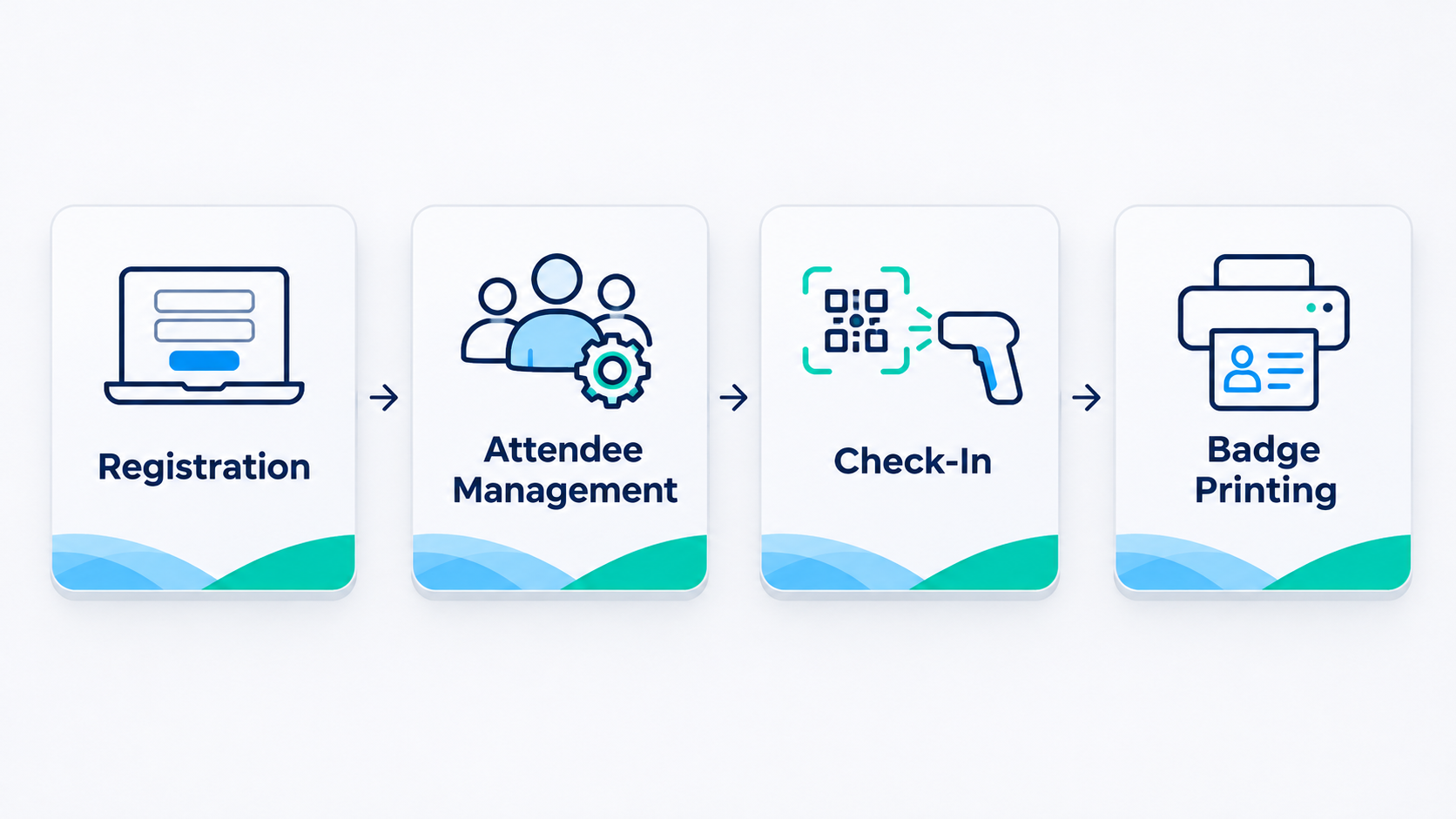
The best registration system is not necessarily the one with the longest feature list.
It is the one that supports the way your event operates.
A 75-person university symposium may need a dependable form, clear confirmation messages, and an accurate attendee export.
A 1,500-person industry conference may need multiple ticket types, payment processing, session capacity controls, exhibitors, group registration, and several check-in stations.
Before choosing software, organizers should evaluate these requirements:
| Consideration | Question to ask |
|---|---|
| Attendee volume | Can the system support the expected registrations? |
| Registration experience | Is the form easy to complete on mobile? |
| Ticketing | Can it manage the necessary categories and pricing? |
| Data management | Can records be updated and exported? |
| Check-in | How are attendees identified when they arrive? |
| Badge production | Can the required badge information be transferred? |
| Reporting | Can we compare registrations and actual attendance? |
| Support | What help is available if something fails during the event? |
It is also worth conducting a complete test using a sample attendee.
Register that person, send a confirmation, update their details, export the record, and prepare their badge.
This simple exercise can uncover compatibility issues that aren't obvious during a software demonstration.
Online conference registration vs. on-site registration
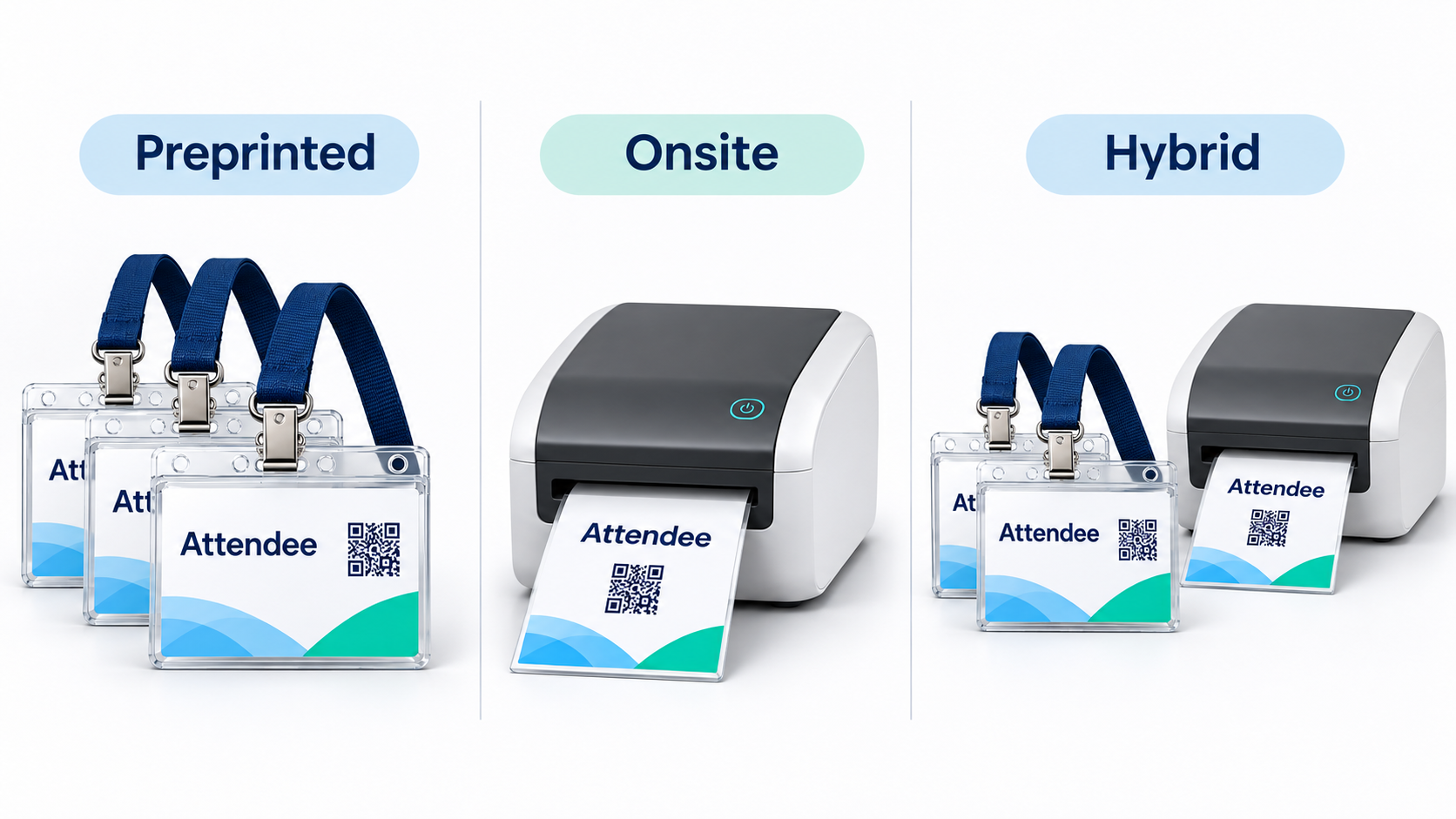
Online registration gives organizers advance visibility into attendance.
It helps estimate catering requirements, assign rooms, prepare conference welcome packs, and produce attendee badges before the event.
On-site conference registration serves a different purpose.
It accommodates walk-ins, last-minute additions, and attendees whose original registration needs to be corrected.
Both approaches have tradeoffs.
Online registration reduces the amount of information staff must collect when attendees arrive, but it requires a dependable system for managing changes.
On-site registration provides flexibility, but collecting information and producing credentials during peak arrival periods can create delays.
For many conferences, the best solution combines advance registration with a clearly defined process for exceptions.
Amanda Collett's perspective on last-minute changes:
Last-minute changes are almost inevitable when organizing a conference, regardless of how carefully everything has been planned.
Someone might register the day before the event, a speaker's details might change, or an attendee might arrive and discover that their badge contains incorrect information.
The challenge is that organizers may have already completed their main badge production run, leaving very little time to make changes.
We've designed ConferenceBadge to help organizers prepare for situations like these. For example, organizers can add new attendee information, generate individual badge PDFs, and print replacements without having to reproduce the entire batch.
One of the benefits of having a separate process for last-minute changes is that it prevents individual corrections from disrupting the registration experience for everyone else.
I would recommend that organizers prepare for these exceptions before the event begins, rather than assuming every attendee will have a correct, preprinted badge waiting for them.
That means having a dedicated printer available, testing the badge design and paper beforehand, keeping spare printing materials on hand, and ensuring registration staff know how to correct attendee information.
It's also important to assign responsibility for these tasks. If an attendee arrives with a missing badge, the person at the main check-in desk shouldn't have to figure out the entire printing process while other attendees are waiting.
The goal isn't to eliminate every unexpected situation. It's to make sure unexpected situations don't bring registration to a standstill.
Conference registration pricing: What does it cost?
The total cost of conference registration includes more than software.
Organizers need to consider ticketing fees, payment processing, staff time, badge production, equipment, and support.
Software and payment costs
Some registration platforms charge subscriptions or licensing fees. Others charge per registration or per paid ticket.
Enterprise event management platforms may provide custom quotes based on required products and services.
For paid conferences, payment processing costs can represent another expense.
It's important to compare the total cost of registration rather than just the advertised platform fee.
Badge printing and equipment
ConferenceBadge currently offers downloadable PDF badges priced at $0.39 per badge, with organizers responsible for printing them.
Professionally printed badges and other formats have separate pricing.
Printing internally may save on certain production expenses, but the calculation should account for badge stock, printers, ink, assembly, and staff time.
Consider a hypothetical 500-attendee conference that purchases 500 PDF badges.
At $0.39 each, the digital badge cost would be $195, excluding printing materials and labor.
This example illustrates why organizers should compare the complete production workflow rather than the price of an individual badge.
The overlooked cost of administration
Registration also creates administrative work.
Someone must answer attendee questions, process changes, reconcile records, prepare exports, and handle exceptions.
An inexpensive system that requires hours of manual corrections may end up costing more than a better-connected workflow.
The same applies to badge assembly.
Printing, cutting, sorting, inserting, and distributing hundreds of credentials requires time.
For a larger conference, professional printing and assembly may be worth the expense because it allows the organizing team to focus on other event responsibilities.
Conference registration best practices that improve the attendee experience

A smooth registration experience begins before someone completes the form.
Attendees should understand what the conference includes, what their ticket provides, and what happens after payment or registration.
Once they submit their information, clear communication becomes particularly important.
Confirmation emails should provide details about the conference, while pre-event messages can explain arrival times, entrance locations, identification requirements, and badge collection.
For events with multiple attendee types, the instructions should reflect those differences.
An exhibitor arriving for setup may need different directions than a general attendee arriving for the opening keynote.
The registration area also needs to match expected arrival demand.
If a conference anticipates several hundred attendees arriving within a short window, organizers should consider how many staffed stations are required, how badges will be organized, and what happens when a record cannot be found.
The objective is to prevent one attendee's problem from delaying everyone behind them.
Amanda Collett's perspective on registration bottlenecks:
One challenge we see in badge production is that registration data isn't always formatted the way organizers expect when it comes time to print.
An organizer might collect attendee information through a registration platform, but the exported spreadsheet can contain missing company names, inconsistent capitalization, duplicate registrations, or information stored in the wrong columns.
These inconsistencies become much more noticeable when that data is transferred onto a physical badge. A long job title might not fit properly within the design, or a company name might be missing entirely.
The best way to avoid these problems is to review the attendee data beforehand. This may not be practical with thousands of attendees and this is where AI shines so brilliantly. AI is fantastic at comparing and analyzing data at light speed.
The important lesson is that collecting registration data and preparing print-ready attendee data are not necessarily the same thing. Organizers should treat data validation as a separate step rather than assuming everything collected during registration is ready for printing.
Common conference registration mistakes and how to avoid them

Many registration mistakes are not visible until the organizing team begins preparing for arrivals.
One of the most common is collecting unnecessary information. A long form can become frustrating, particularly when someone is registering from a phone.
Another is failing to collect information needed for event operations.
For example, if a networking event requires attendees to display their company names, that information should be requested in a way that can be transferred into the badge workflow.
Inconsistent categories create similar problems.
Imagine a conference using the labels "Speaker," "Presenter," and "Panelist" without defining whether these are separate attendee types.
The registration platform may treat them as different categories, even though the event team intends to issue the same speaker credential to everyone.
A simple category standard established before registration opens can prevent those inconsistencies.
Not preparing for peak arrival periods
An event may have 900 registered attendees, but they rarely arrive evenly throughout the day.
If most participants arrive shortly before the opening keynote, check-in demand can rise dramatically.
Organizers should assess registration station capacity, badge sorting, and how long different arrival scenarios may take.
Special attention should be given to lost registrations, missing names, late additions, and incorrect badges.
These exceptions often require more staff attention than ordinary check-ins.
Not testing the full workflow
A registration form can function correctly while the overall process fails.
Confirmation emails might not contain enough information. Attendee exports could omit important fields. Badge layouts might be unable to accommodate long names.
These issues are easier to resolve during testing than on conference day.
The final test should extend beyond submitting a form. It should follow an attendee record all the way through check-in and badge preparation.
Here’s one of the biggest mistakes Amanda warns against:
Last-minute changes are almost inevitable when organizing a conference, regardless of how carefully everything has been planned.
Someone might register the day before the event, a speaker's details might change, or an attendee might arrive and discover that their badge contains incorrect information.
The challenge is that organizers may have already completed their main badge production run, leaving very little time to make changes.
We've designed ConferenceBadge to help organizers prepare for situations like these. For example, organizers can add new attendee information, generate individual badge PDFs, and print replacements without having to reproduce the entire batch.
One of the benefits of having a separate process for last-minute changes is that it prevents individual corrections from disrupting the registration experience for everyone else.
Choosing the right badge format
Different event use cases call for different identification.
Trade Show Badges may emphasize attendee categories and networking information. Corporate event name badges may focus on names, titles, and organizational affiliation.
Name badge inserts offer flexibility when events use holders, while cardboard credentials provide another approach for conferences and exhibitions.
Event badge sizes also matter because they influence readability, the amount of information displayed, and the badge's intended use.
Even choosing a font for event name tags becomes important when attendee names need to be read from several feet away.
Organizers evaluating conference badge alternatives should consider production time, assembly, durability, cost, and how changes will be handled.
Using attendee data for badge production
Registration records can be prepared for ConferenceBadge using attendee imports and variable badge information.
This makes it possible to create name badges from Excel or name badges from Google Sheets after exporting or preparing the attendee list.
However, organizers should still review the records for spelling mistakes, inconsistent fields, and missing categories.
Badge integrations or export workflows should be tested before the conference.
A registration system and badge platform do not need to provide identical functionality, but the data transferred between them needs to be reliable.
Planning onsite printing
Even professionally prepared events need an exception process.
ConferenceBadge's PDF workflow supports on site printing, providing a way to create replacement badges for walk-ins, name corrections, and late registrations.
For many conferences, a hybrid approach works well.
Prepare the majority of badges before the event, then retain printing capacity for unexpected changes.
Explore ConferenceBadge's badge products and printing options: https://www.conferencebadge.com/products
Conference registration checklist for event organizers
Before registration opens:
Define attendee categories, ticket types, and required information.
Choose registration software and confirm payment requirements.
Test forms, confirmation emails, and mobile usability.
Verify attendee export formats and badge data requirements.
Before the conference:
Review registrations, duplicates, and cancellations.
Finalize attendee categories and badge designs.
Prepare preprinted badges or printing equipment.
Assign check-in responsibilities and create exception procedures.
On event day:
Verify arrivals and distribute credentials.
Provide a process for walk-ins and incorrect registrations.
Monitor queues and resolve operational problems.
Maintain accurate attendance records.
After the event:
Compare registration totals with actual attendance.
Review attendee feedback and post event survey questions.
Document problems that should be addressed before the next conference.
Conference registration is about more than collecting names
A good conference registration process should feel relatively uneventful to attendees.
They register, receive confirmation, arrive at the venue, collect their badge, and enter the conference.
That simplicity is the result of considerable planning.
Organizers need to coordinate registration software, attendee information, ticketing, communications, event check-in, and identification.
When those activities work together, staff spend less time correcting records and attendees spend less time waiting.
For small conferences, the solution may be a basic registration form and a straightforward badge workflow. For larger events, dedicated software and professional badge production can reduce manual work and support more complicated arrival requirements.
ConferenceBadge helps event teams connect the attendee information they have already collected with professionally designed badges, printable PDFs, preprinted credentials, and onsite printing options.
Explore ConferenceBadge for your next event
Frequently asked questions about conference registration
What is the average conference registration fee?
There is no universal average registration fee. Prices vary based on industry, location, duration, speaker program, and event format. Some academic and association conferences charge modest fees, while large commercial conferences may charge considerably more. Organizers should compare similar conferences rather than rely on an overall average.
Where can I find a conference registration form?
Conference registration forms can be created using Google Forms, Jotform, Cvent, or other event registration platforms. Many services provide customizable form templates. The best choice depends on whether the event requires paid tickets, multiple attendee categories, session selection, or integrations.
What is the best way to register people for an event?
For most conferences, online registration is the most practical starting point because organizers can collect information before the event. The system should provide clear confirmations, maintain accurate records, and support a reliable check-in process. An onsite registration option can accommodate last-minute attendees.
Do I have to register to attend a conference?
Most conferences require registration, even when admission is free. Registration helps organizers estimate attendance, control access, communicate event details, and prepare credentials. Some events permit walk-in registration, but this depends on the organizer's policies and capacity.
Where will your conference registration happen?
Conference registration usually begins online through an event website or registration platform. At the venue, attendees typically visit a check-in station to confirm their arrival and collect their badges. Some conferences also provide self-service kiosks or onsite registration desks.
Are there different types of Conference Registration Forms?
Yes. Forms may be designed for free events, paid conferences, academic gatherings, trade shows, corporate meetings, virtual events, and hybrid conferences. Each format collects different information based on ticketing, sessions, attendee categories, and event logistics.
How do Conference Registration Forms help with virtual events?
Registration forms for virtual events collect contact information, confirm participation, and support digital access instructions. They may also capture timezone preferences, session selections, and other information necessary for online attendance. Physical badges and onsite check-in may not be required for fully virtual conferences.
Is this something Cvent can handle?
Yes. Cvent offers conference registration, attendee management, event communications, and payment-related features. Its additional event management products support check-in and badge printing. Available capabilities depend on the purchased solution and configuration.
How does Event Registration Software Pricing work?
Event registration software may charge subscription fees, per-registration fees, ticket transaction fees, or custom enterprise licensing costs. Additional expenses can include payment processing, integrations, support, and onsite equipment. Organizers should request a complete breakdown before selecting a platform.
What is conditional logic?
Conditional logic is a form feature that displays or hides questions based on previous answers. For example, an attendee selecting an exhibitor ticket might see questions about their organization or booth, while general attendees would not. It helps reduce unnecessary questions and creates a more relevant registration experience.
How can I confirm my conference registration status?
Check your confirmation email or sign in to the conference's registration portal, if one is available. Your confirmation may include an order number, ticket, QR code, or registration reference. If you cannot find confirmation, contact the event organizer using the email address you registered with.
What information is typically required for conference registration?
Most conferences require an attendee's name, email address, and registration or ticket category. Depending on the event, organizers may also request company information, session choices, payment details, and accessibility requirements. Badge display names may be collected separately to support personalized identification.
How do I check the status of my conference registration?
Look for a confirmation email, access your registration account if the platform provides one, or contact the event registration team. For paid conferences, verify that payment was successfully processed. Registration status and event-day check-in status are different, so a confirmed registration does not necessarily mean attendance has been recorded.